
How Rapport is structured for developers — Organisations, Workspaces, Projects, Assets, and Services explained, including automatic setup on sign-up.
Overview
Rapport is designed to support flexible collaboration across teams and projects.
When you sign up, Rapport automatically creates your Organisation and a default Workspace, so you can start building immediately.
Each Organisation can include multiple Workspaces, each containing Projects, Assets, and Services. This layered structure ensures scalability, control, and clarity as your AI-driven experiences grow.
Automatic Setup
On first sign-up, Rapport prepares everything you need behind the scenes:
-
Your Organisation and a default Workspace are created automatically.
-
You’re taken directly to the Template Grid, where you can preview, choose, or create a new Project.
-
Selecting Edit Template or Save & Share opens Project Setup, where your project is saved to your Workspace.
-
Creating additional Organisations later will also generate their own default Workspaces automatically.
💡 This streamlined flow ensures you can start working with an animated experience instantly — no setup screens or manual configuration required.
🔗 Learn more: [How to Use Pre-Configured Templates →] for a step-by-step guide to exploring, previewing, and saving templates.
Template Grid Overview
The Template Grid replaces the old blank-project screen with a visual, guided starting point.
Each card represents a complete, ready-to-run scenario that demonstrates Rapport’s capabilities.
Figure 1: The Rapport Template Grid
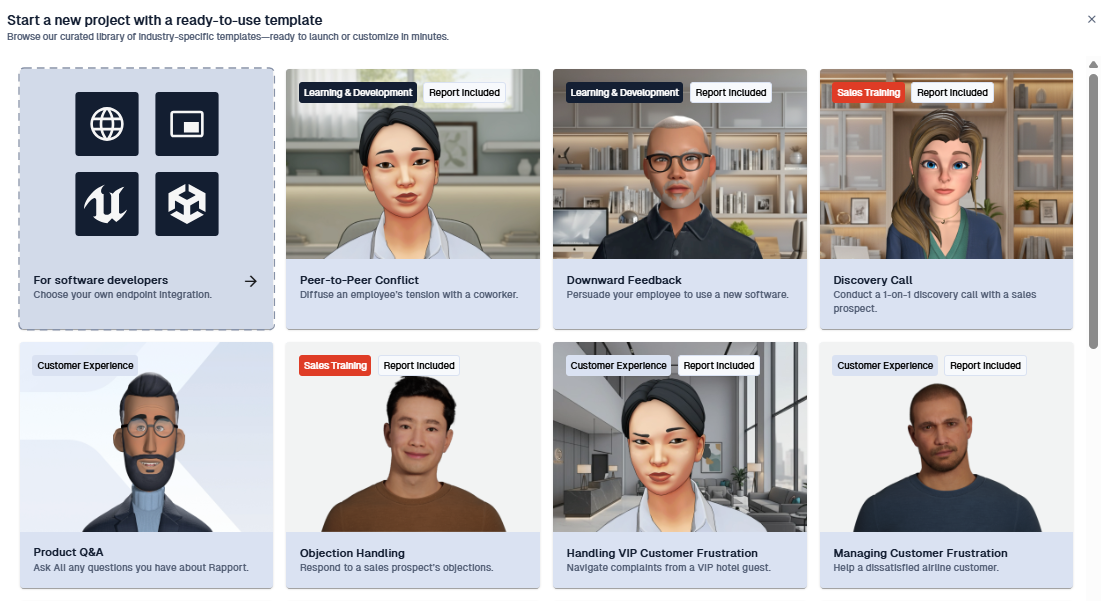
Templates are tagged to help you choose quickly:
-
Sector – e.g. Learning & Development, Sales Training, Customer Experience
-
Scenario Type – described on each card (e.g. Coaching, Feedback, Objection Handling)
-
Report Included – marks templates that feature built-in performance analytics
You can:
-
Preview any scenario — interact freely, then return to the grid at any time.
-
Save or Edit a template to turn it into a live project in your Workspace.
All templates include fully configured AI, STT, TTS, and character settings — ready to interact with immediately.
🔗 See also: [Project Setup: Creating Projects →] to learn what happens once you open a template in Project Setup.
Unified Start
Whether you’re a creator exploring templates or a developer testing integrations, the Template Grid gives you a guided, low-friction start — getting you from sign-up to an interactive experience in seconds.
From this single starting point, you can:
-
Explore real-world scenarios for inspiration.
-
Create your own projects by saving or editing templates.
-
Jump into technical integrations through the Developer Card (Web, Widget, Unreal and Unity c).
Hierarchy Overview
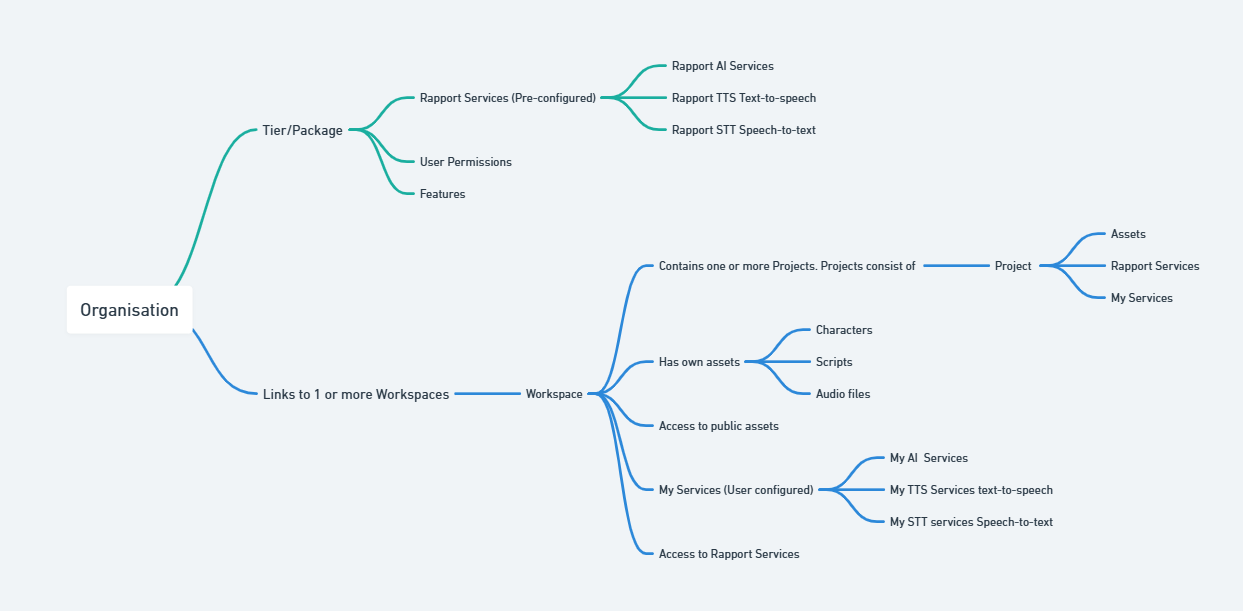
Structure: Organisation → Workspace → Project → Assets
|
Level |
Purpose |
|---|---|
|
Organisation |
Manages subscription tier, billing, user access, and global Rapport Services |
|
Workspace |
Holds Projects, Assets, and My Services |
|
Project |
Configures characters, AI, STT, TTS, branding, and deployment |
|
Assets |
Reusable content such as characters, scripts, and audio |
📘 Figure 2: Rapport Organisational Structure — showing how Organisations link to Workspaces, Projects, and Assets.
Organisation
Your Organisation acts as the administrative home base:
-
Controls tier/package, billing, and user permissions
-
Provides access to preconfigured Rapport Services (AI, STT, TTS)
-
Links to one or more Workspaces
Workspace
A Workspace is your team’s collaborative environment for building projects.
Each Workspace:
-
Hosts Projects (your interactive experiences)
-
Contains Assets (characters, audio, scripts)
-
Includes My Services — custom integrations using your own credentials
-
Can access shared Public Assets
-
Supports collaboration with defined roles and permissions
Project
A Project defines how your digital character behaves and appears.
It includes:
-
Character selection and visual configuration
-
AI model and prompt setup
-
STT and TTS providers
-
Language and voice selection
-
Layout, branding, and controls
-
Real-time preview and deployment options (Web Page, Widget, Unreal and Unity)
Services: Rapport vs My Services
Rapport connects AI, STT, and TTS providers through two linked systems:
|
Feature |
Rapport Services (Global) |
My Services (Workspace) |
|---|---|---|
|
Setup Required |
❌ No |
✅ Yes |
|
Editable Credentials |
❌ Locked (secure) |
✅ Fully editable (secure) |
|
Reusable Across Projects |
✅ Yes |
✅ Yes |
|
Appears In |
Project Setup, Advanced Settings |
Project Setup, Advanced Settings, My Services |
|
Best For |
Fast prototyping / no setup |
Enterprise control & compliance |
-
Rapport Services (Global): Preconfigured, ready to use (OpenAI, Gemini, Groq, AWS, Azure, Speechmatics, Whisper, ElevenLabs). Availability depends on your Organisation’s tier.
-
My Services (Workspace-Level): Created by Workspace Admins using your own API credentials. Fully editable, reusable, and ideal for compliance or cost control.
📘 For details, see:
Further information about Services, AI Services, STT Services, TTS Services.
Roles & Permissions
|
Role |
View Services |
Use in Projects |
Create / Edit My Services |
View Credentials |
|---|---|---|---|---|
|
Workspace Admin |
✅ |
✅ |
✅ |
✅ |
|
Workspace Member |
✅ |
✅ |
❌ |
❌ |
|
Workspace Viewer |
✅ |
❌ |
❌ |
❌ |
-
Rapport Services are read-only for all users.
-
My Services can be created or edited only by Workspace Admins.
Best Practice: If your organisation relies on specific AI or voice providers, have an Admin add them under My Services so all projects use the correct configuration.
Why This Matters
✅ Instant start: Organisation, Workspace, and templates are created automatically
✅ Frictionless flow: One click takes you from signup to editing a live experience
✅ Flexible paths: Intuitive for creators, powerful for developers
✅ Consistent architecture: Unified structure for all projects